

E-Mobile

A user-friendly CMMS system always in your pocket
With eMobile, your team completes work orders faster, the warehouse operates more efficiently and reports are always within easy reach.
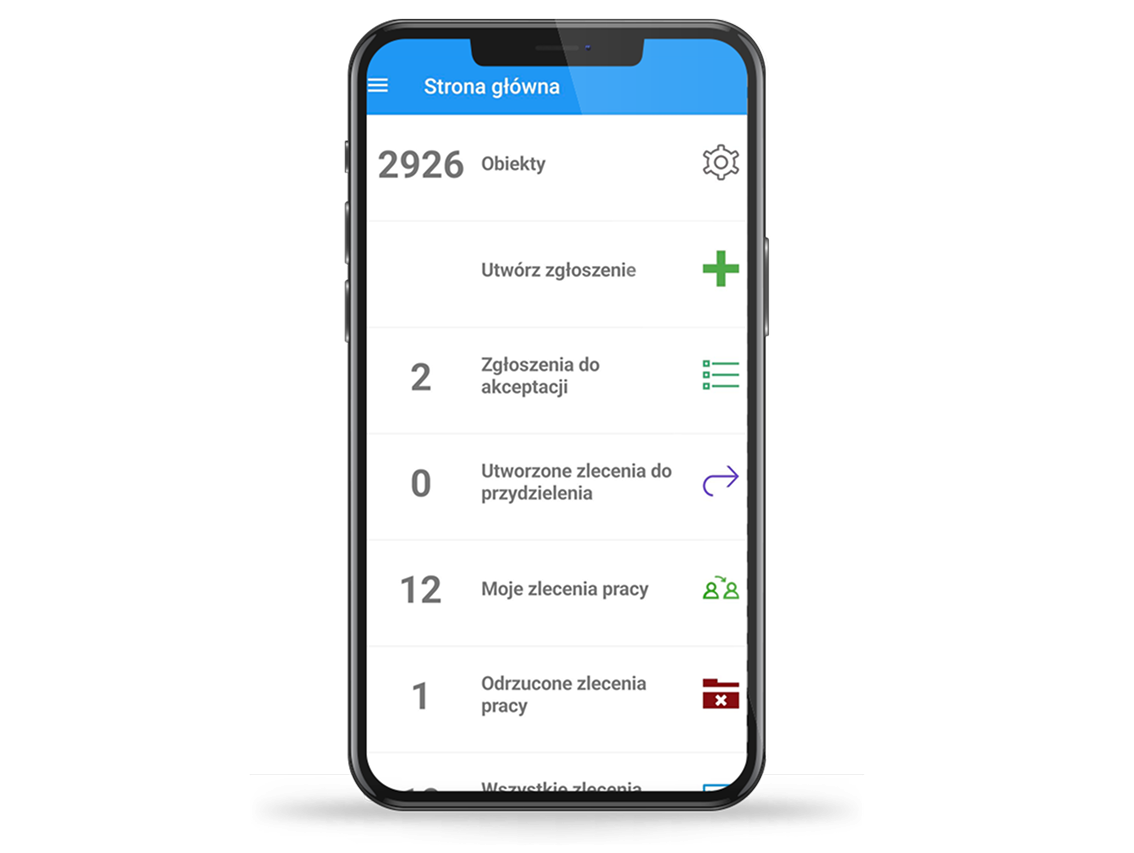
What is eMobile app?
eMobile is a mobile extension of CMMS/EAM systems, designed for field and shop-floor personnel. It provides full access to work orders, requests, inventory and fleet data — without the need to return to the office.
Thanks to offline functionality and automatic data synchronisation once the connection is restored, your employees can work effectively in any conditions. QR-code handling, push notifications and NFC login make every process faster, more accurate and more secure.
The application runs on smartphones, tablets and touch-enabled laptops using iOS, Android or Windows. Its integration with leading CMMS and ERP systems (including HxGN EAM and SAP) ensures seamless connectivity between field operations and the central system.
Operational challenges that hold your organisation back
See how the e-Mobile application addresses thema
Dispersed
information
eMobile consolidates all work orders, requests and notes in a single system, giving your team a complete and consistent view of the situation.
Delays
in execution
With eMobile, status updates and field reports are sent to the system in real time, significantly shortening response times.
Documentation
errors
The application automates documentation, eliminating mistakes that arise from manual entry. Photos, QR codes and signatures are attached to the work order immediately.
Inaccurate
stock levels
eMobile allows you to view and update inventory from anywhere, making planning and reporting significantly faster and more reliable.
Downtime
and rising costs
eMobile shortens diagnostic and repair times. With a unified data set, you eliminate unnecessary stoppages and keep losses to a minimum.
What will you gain with eMobile?
eMobile is a mobile tool that brings the full capabilities of your CMMS/EAM system directly into the field. It enables faster task execution, better communication and complete control over processes — wherever you are.
01
Instant access to work orders and requests
View, filter and update job statuses in real time, without needing to return to the office.
02
Offline work in any conditions
No internet connection? The app operates offline and synchronises all data as soon as the connection is restored
03
Accurate and fast documentatio
Add photos, scan QR codes and record measurements and electronic signatures directly within the work order.
04
Warehouse control in your pocket
Check part availability, record issues and returns, and carry out stocktakes from anywhere.
05
Improved team communication
Push notifications keep you informed of new tasks and status changes without delay.
06
Integration with the central system
It synchronises seamlessly with CMMS/EAM and ERP systems to ensure that all data remain current and consistent.
Who is e-Mobile designed for?
The application is designed for organisations that want to streamline the work of technical, warehouse and field-service teams — wherever rapid response and up-to-date data are essential.
Maintenance departments
Field service teams
Warehouse and logistics staff
Managers and coordinators
Manufacturing, service and utility companies
Fleet-management organisations
Technical teams in the energy and water utilities sector
Organisations operating across dispersed facilities
Our solution, in its standard configuration, can support the following functions:
Work orders
- Viewing work orders on dedicated lists from the main menu, based on their status
- Assigning a work order to the appropriate employee using the employee list
- Adding labour hours for staff
- Viewing the work history for a given order
- Issuing materials from the warehouse for a work order
- Viewing the history of material issues
- Returning materials directly from the issue-history view
- Completing tasks assigned to a work order using the task list, with selectable task statuses
- Recording measurements for an asset or task linked to the work order
- Adding attachments to the work order
- Entering comments directly in the work-order details
Work requests
- Creating requests directly from an asset’s detail view, with the option to take a photo of the asset or material concerned
- Adding attachments to the request
- Creating a request by scanning a QR code
- Approving or rejecting a request, including an accompanying comment
Warehouse management
- Viewing stock levels and material lists, with the option to add a photo for each item
- Issuing materials from the warehouse to a selected work order
- Returning selected materials for a work order directly from the list of issued items
- Receiving materials and tools into warehouse stock
- Performing inter-warehouse transfers of materials and tools
- Returning or scrapping worn-out tools
- Handling stocktaking with selection of a specific warehouse and material item, using QR codes
Purchasing
- Adding items to a purchase request that is currently in progress
- Receiving deliveries for orders selected from the list
Technical asset database
- Viewing the list of assets and their detailed information
Fleet management
- Issuing a vehicle using the driver’s electronic signature
- Returning a vehicle
Reports
- Viewing reports on reported faults
- Viewing work-order reports categorised by status
Push-notification integration
- The user receives notifications about events registered in e-Mobile directly on their mobile device’s screen, without needing to open the application.

Additionally, we can enable, among other things:
RFID scanning
- The eMobile application is compatible with RFID tag handling, enabling quick identification of technical assets, tools or warehouse materials.
NFC card support
- If the selected mobile device supports NFC technology, processes such as logging into the application can be simplified. By tapping an NFC card to the device, the user can log into eMobile instantly.
Our clients
Slide

Our high expectations were fully met — both in terms of system functionality and the quality of collaboration.

Public Company Orlen Lietuva
Director of Minetenance Bogusław Zgorzelski
Slide
The project was delivered successfully — on schedule, within scope and fully aligned with our organisation’s expectations.

AB Klaipėdos Nafta
Chairman of the Contract Execution Control Commission Andrius Betingis
Slide
The team demonstrated remarkable flexibility and extensive expertise, which greatly facilitated the project’s delivery.

Enefit Green AS
Asset Manager Toivo Joosua
Slide
The cooperation was marked by reliability and professionalism at every stage of delivery.

PGE Energia Odnawialna S.A.
Director of the Production Asset Management Department — Mirosław Fyk
Slide
The assigned task was executed effectively, in line with the planned schedule and scope of work.

KGHM Polska Miedź S.A.
Director of the Central Information Processing Centre — Piotr Pawłowski
Slide
Throughout the collaboration, we received substantive and technical support of the highest standard.

Wabco Polska Sp. z o.o.
System Administrator — Stanisław Mumot
Slide
The team demonstrated a high level of professionalism and a flexible approach to the project’s evolving requirements.

Hochtief Facility Management Polska Sp. z o.o.
President of the Management Board — Zbigniew Kucharski
Slide
The cooperation was conducted with exemplary business culture and confirmed the contractor’s strong professional competence.

Farm Frites Poland S.A.
Head of Maintenance — Jarosław Karolik
Slide
The project’s execution confirmed the team’s extensive knowledge and deep experience in CMMS/EAM systems.

Grupa Lotos S.A.
Technical Director — Grzegorz Błędowski
Slide
The project was delivered with full commitment, strong professionalism and a high degree of flexibility.

Philips Lighting Poland S.A.
Maintenance Manager — Andrzej Sadowski
Slide
The team stood out for its reliability as well as its expert knowledge and experience, which directly translated into the quality of the delivery.

Faurecia Wałbrzych S.A.
Director of the Mechanisms Plant — Karol Zieliński
Slide
The team demonstrated strong determination and consistency in delivering even the most demanding stages of the project.

Wavin Polska S.A.
Head of the Maintenance Department — Jacek Kołodziej
Slide
Eurotronic has proven to be a business partner fully worthy of trust and recommendation.

Polpharma S.A.
Director of the Technical Business Support Department — Tomasz Hartuna
Slide
The team received high marks for its commitment and proactive collaboration throughout the project.

Kimball Electronics Poland Sp. z o.o.
Machine Maintenance Section Manager — Jacek Gapski
Slide
The project was completed effectively and on time, in full accordance with the agreed action plan.

KGHM Zanam S.A.
President of the Management Board — Bohdan Pecuszok
Slide
The implementation of the ZMT system proceeded smoothly and without disruption, with full support from the technical team.

Przedsiębiorstwo przeładunku paliw płynnych Naftoport Sp. z o.o.
Member of the Management Board — Jerzy Starnawski
Slide
The task was carried out with due diligence and fully in line with our organisation’s expectations.

CEZ Skawina S.A.
Director of Development — Marek Jaglarz


Faq
Does eMobile work without internet access?
Yes. The application supports offline mode — you can complete work orders, add photos and fill in documentation without a connection. All data synchronise automatically once internet access is restored.
Which systems does e-Mobile work with?
eMobile integrates with CMMS/EAM systems such as HxGN EAM, ZMT, E-Service, MP2 and SZEOR. It can also be connected to ERP platforms (e.g. SAP) and other solutions used within the organisation.
On which devices can e-Mobile be used?
The application is available on smartphones and tablets running Android and iOS, as well as on laptops and touch-enabled devices using Windows.
Is the application secure?
Yes. eMobile uses encrypted connections, and login can be performed via password, PIN, biometric authentication or an NFC card (if supported by the device).
Can eMobile be tested before implementation?
Yes. A demo version is available in Google Play and the App Store, allowing you to explore the interface and core features of the application.
⏳ Ładowanie przycisków AI...