Gantt

Create schedules that work in the real world

Gantt is designed to help you make fast, well-informed decisions and keep every project perfectly on track.

Gantt

What is Gantt?

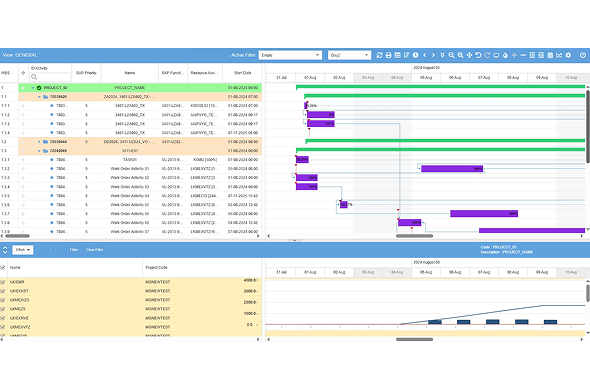
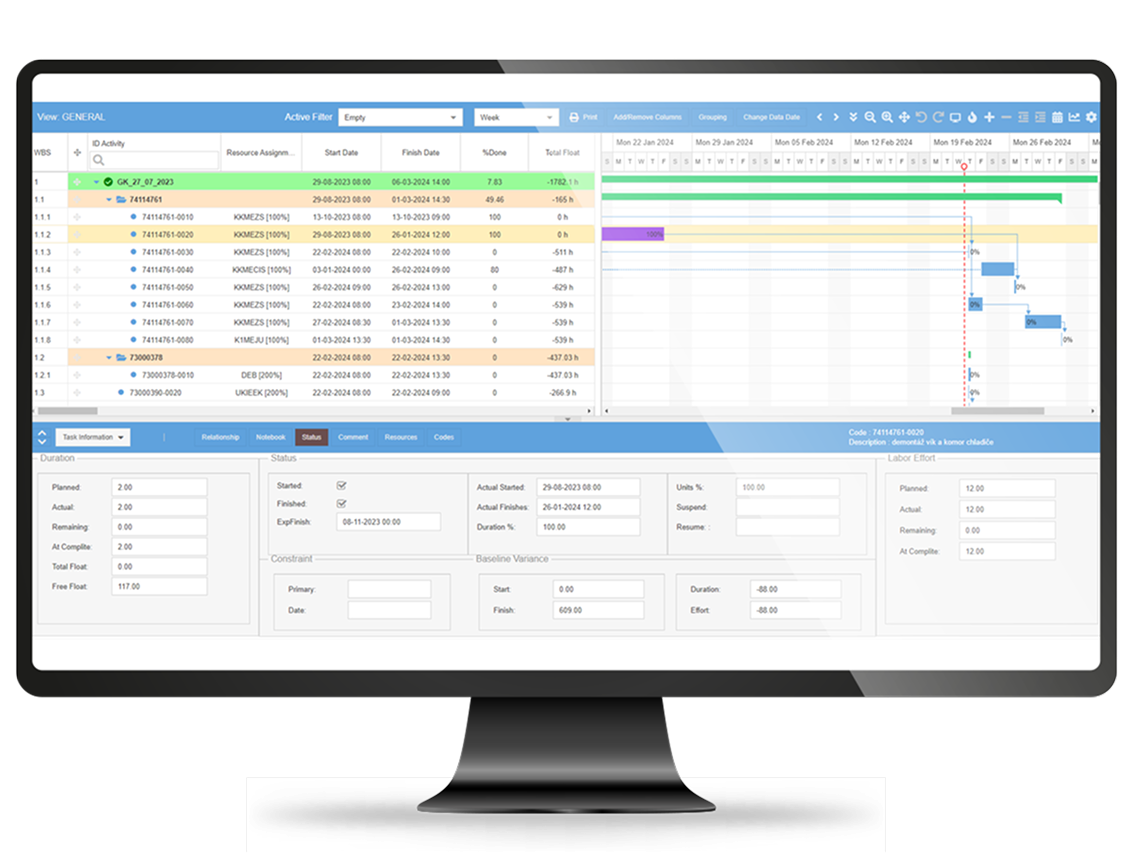
A Gantt chart provides a visual timeline where every task has a defined start and finish, clear dependencies and assigned resources. It gives project managers and their teams an immediate, shared understanding not only of what needs doing, but also when, in what sequence and under what constraints.

With the Gantt module, even highly complex projects become an intelligible, structured roadmap. Decisions can be made faster and with confidence, backed by current and reliable data. It removes noise, shortens reaction times and helps you deliver projects on schedule, whatever their scale.

Gantt

Our Gantt module offers:

  • An interactive schedule where every change is reflected instantly, with the system automatically recalculating dates, resources and task dependencies.
  • Visual progress control, including critical-path analysis, Earned Value Management (EVM), baseline comparison and resource-usage charts.
  • Seamless integration with EAM/CMMS platforms to ensure full alignment with maintenance processes, shutdown planning and work-order execution.
  • Real-time collaboration, where updates are immediately visible to all users without any risk of data loss.

Operational challenges that hold your organisation back

See how the Gantt module addresses them

Lack of a transparent schedule

The Gantt module consolidates all activities into a single, intelligible timeline, highlighting task dependencies and realistic deadlines.

Delays caused by unforeseen changes

Real-time recalculation of the schedule enables immediate corrective action and significantly reduces the impact of slippage.

Difficulty monitoring progress

Earned Value Analysis, critical-path visibility and baseline comparison reports provide continuous, data-driven oversight of project performance.

Underutilised resources

Resource-load charts support balanced allocation of work and help prevent idle time or bottlenecks.

Challenges in coordinating multiple projects

Multi-project views make it easier to align activities, avoid clashes and maintain consistent control across parallel workstreams.

What will you gain with the Gantt module?

It is a tool that combines a clear, visual schedule with advanced progress analytics and efficient resource management. With it, your projects stop being a collection of disconnected tasks and become a coherent, controlled plan that guides your team from kick-off to completion without chaos, delays or unwelcome surprises.

01

Full command of the schedule

All tasks, deadlines and dependencies consolidated in a single, intelligible view.

02
Rapid response to change

Automatic recalculation of the plan with every adjustment, instantly reflecting new conditions.

03
Better utilisation of resources

Balanced workloads across staff, equipment and materials for maximum operational efficiency.

04

Reliable progress tracking

Critical path visibility, earned value analysis and baseline comparisons for accurate monitoring.

05
Smoother team collaboration

A single source of truth accessible to every project stakeholder.

06
Fewer delays and less disorder

Clear priorities, well-defined objectives and continuous oversight of delivery.

Gantt

Gain complete, real-time control
over your projects.
Gantt

Who is the Gantt module designed for?

The module has been designed for organisations seeking to streamline planning processes, accelerate their response to change and increase overall team efficiency.

Project managers

Maintenance teams

Production and operations managers

Companies delivering multiple projects simultaneously

Organisations working within an EAM/CMMS environment

Planning and logistics departments

Engineers and modernisation specialists

Service and contractor teams

Key capabilities of the Gantt module

Reporting

The Gantt module includes a built-in reporting engine that enables users to generate reports based on selected columns and data sets. It also supports the use of external reports (outside the Gantt module) that directly draw from data provided by the Gantt engine.

Data presentation configuration

 The configuration console allows users to define the scope and structure of the information displayed within the Gantt module.

Data presentation personalisation

Users can tailor the view by selecting which data fields to display and in what order.

Interactive calculations

The system responds dynamically to user actions on the Gantt chart or data grid, triggering recalculations that maintain data integrity and stability, while also detecting invalid or questionable operations.

Gantt
Gantt
Gantt

Charts and visual analytics

The module includes built-in visualisations such as resource utilisation charts based on defined capacity limits, as well as earned value management (EVM) charts.

Baseline projects

Baselines allow users to compare the current state of a project against its original plan. This functionality is essential for applying earned value methodologies.

Critical path analysis

Automatic identification of the project’s critical path helps project managers allocate resources effectively and provides early visibility of potential delays.

Additional capabilities provided by the system include:

Gantt

Our clients

Faq

The Gantt module is a fully functional, standalone tool for project planning and control using an interactive Gantt chart interface. It can be deployed independently as a central planning environment, yet it has been designed for seamless integration with Enterprise Asset Management (EAM) and Computerised Maintenance Management Systems (CMMS). This makes it fully compatible with platforms such as Eurotronic CMMS ZMT or HxGN EAM, enabling real-time synchronisation of work orders, resources and schedules.

The Gantt module is a browser-based web application, fully optimised for Google Chrome and Microsoft Edge. It requires a .NET Framework 4.8 environment and a Microsoft SQL Server 2016 database or newer to operate correctly. Thanks to its web architecture, users can work from any workstation within the corporate network, and software updates are applied centrally without the need to install applications on individual computers.

Yes. The Gantt module enables parallel management of multiple projects within a single, unified view. Users can switch between schedules or analyse inter-project task dependencies, which is particularly valuable for organisations running numerous investments, production shutdowns or service campaigns. This capability also improves resource coordination, helps prevent scheduling conflicts and supports more effective workload optimisation across teams.

Yes. As an online solution, the Gantt module provides real-time visibility into task and project progress. Any updates made to the schedule are instantly reflected for authorised users, eliminating the risk of working with outdated information. Built-in tools such as Earned Value Management (EVM), critical path identification and baseline comparison enable rapid assessment of whether the project is on track, allowing timely intervention in the event of emerging delays.

Yes. The Gantt module provides extensive customisation options, allowing the schedule to be tailored to the specific needs of each project and the user’s preferences. You can adjust the scope of displayed data, change the order and visibility of columns, modify task colours, define user-specific fields and configure how information is presented within the chart. This ensures that any organisation, regardless of industry, can create a schedule that fully supports its operational processes, from maintenance shutdown planning to large-scale investment projects.

⏳ Ładowanie przycisków AI...